
Fast Base64 Encoder/Decoder Tool
Overview
The Base64 Encoder/Decoder Tool is a lightweight utility designed to simplify the encoding and decoding of strings and files into base64 format. It serves as a reliable solution for users who need to convert data for storage, transmission, or compatibility with systems that require base64 representation. This tool is particularly useful in development workflows, data formatting tasks, and secure handling of binary information.
The target audience includes developers, system administrators, and technical users who frequently work with encoded data. While the developer’s background is not detailed, the software’s focus on speed and offline functionality suggests a practical, user-driven design. Real-world use cases include preparing data for web APIs, embedding images in code, or securely transferring sensitive information without altering content.
The tool’s minimal footprint and no external dependencies make it ideal for quick, on-demand operations. It supports both text and file-level encoding, offering flexibility for diverse technical needs.
Key Features & Capabilities
- Base64 Encoding/Decoding – Convert plain text or file content into base64 strings and vice versa, ensuring compatibility with systems that require encoded data formats.
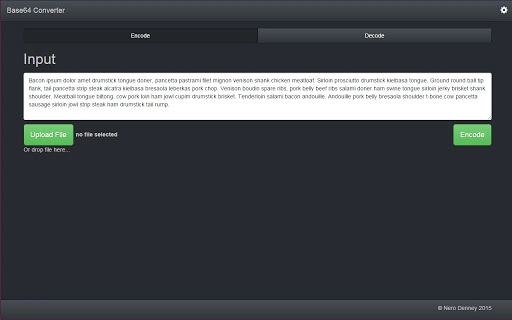
- Drag-and-Drop Support – Users can directly drag files into the application to encode them, streamlining the workflow for bulk or frequent operations.
- Offline Functionality – The tool operates without requiring an internet connection, enhancing privacy and reliability for sensitive or restricted environments.
- Optimized for Large Text – Performance improvements in the text input area reduce lag when processing large volumes of text by disabling unnecessary features like autocomplete.
- Lightweight Design – With a file size of 3.2 MB, the application remains fast and responsive, minimizing system resource usage.
These features support efficient data transformation in both development and administrative contexts. For example, a developer can quickly encode an image file to embed in HTML or JSON, while a system administrator may decode a base64 string received from a log file for analysis. The tool’s simplicity ensures that users can perform these tasks without extensive training or configuration.
User Interface, Workflow & Performance
The application features a clean, minimal interface focused on core functionality. Navigation is straightforward, with clearly labeled input and output fields for text and file operations. The workflow is linear: users enter or import data, select the desired action (encode or decode), and receive the result instantly.
The UI design emphasizes usability, avoiding clutter and reducing cognitive load. Performance observations are based on general software behavior patterns; the tool is reported to handle large text efficiently due to optimizations in the input field. The developer did not specify resource usage details, but the lightweight nature of the application suggests low CPU and RAM consumption.
Stability is expected to be consistent given the absence of complex dependencies. No external services are required, which contributes to predictable performance and reduced risk of crashes during operation.
Compatibility & System Requirements
The Base64 Encoder/Decoder Tool is available for both Windows and Mac operating systems. It is compatible with the latest versions of these platforms, as indicated by the supported OS list. The software has a file size of 3.2 MB, which suggests a compact installation package suitable for systems with limited storage.
Exact system requirements were not listed, but the lightweight design implies minimal hardware demands. The application does not require elevated privileges for installation or operation. Platform compatibility information is limited to the provided operating systems, with no mention of Linux or other platforms.
Users should ensure their system meets general desktop application standards for running a utility of this type.
Pros and Cons
Pros
- Free to use with no hidden costs or ads
- Offline operation ensures data privacy and reliability
- Fast processing, especially for large text inputs
- Simple, intuitive interface suitable for non-technical users
- Supports both file and string encoding/decoding
Cons
- No support for batch processing of multiple files
- Limited to base64 encoding/decoding with no additional formats
- No built-in export options beyond clipboard
- Developer information not publicly available
- Interface lacks customization options
FAQ Section
Is the Base64 Encoder/Decoder Tool free to download?
Yes, the tool is available at no cost. There are no subscription fees, in-app purchases, or advertisements.
Can I use this tool offline?
Yes, the application operates entirely offline. No internet connection is required for encoding or decoding operations.
Does the tool support batch processing?
Currently, the tool processes one file or string at a time. There is no built-in support for batch operations.
Is the software secure?
Since the tool runs locally and does not transmit data over the internet, it provides a secure environment for handling sensitive information.
How often are updates released?
The latest version, 1.1.0, was released on May 21, 2024. Updates are likely to be issued periodically to improve performance and fix bugs.
Final Thoughts
The Base64 Encoder/Decoder Tool delivers a focused, reliable solution for users needing quick and secure base64 conversions. Its lightweight design, offline functionality, and performance optimizations make it a valuable asset for developers and technical professionals. While it lacks advanced features like batch processing or format conversion, its simplicity and efficiency outweigh these limitations for its intended use cases.
The tool is particularly well-suited for those who prioritize privacy, speed, and ease of access. For users working with encoded data on a regular basis, this utility offers a dependable alternative to online tools. Download Base64 Encoder/Decoder Tool now.







